
Generating Narrative Reports: A Step-by-Step Guide
Generating Narrative Reports: A Step-by-Step Guide
The Reports Section allows clients to create detailed narrative reports based on their account data, using either standard templates or personalized templates. This feature provides flexibility in how reports are generated and delivered.
How to Generate a Report
Follow these simple steps to generate a report:
-
Navigate to "Reports":
Go to the "Reports" section in the side menu. -
Choose a Report Type:
Select either a standard or personalized template for your report. -
Select a Template:
From the available options, choose the template that best fits your reporting needs. -
Click "Generate":
Press the "Generate" button to initiate the process. -
Choose the Report Year:
Specify the year for which you want to generate the report data. -
Confirm the Generation Process:
Confirm your selection to begin the report generation. -
Check Your Inbox:
Once the report is generated, you will receive an email from the system. -
Download the Report:
Open the email and click on the download link to access your report.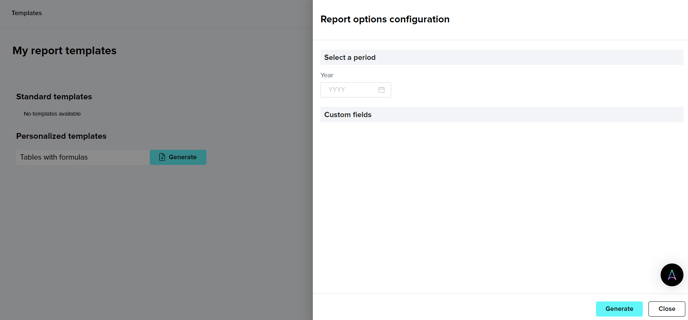
By following these steps, users can quickly and easily generate narrative reports tailored to their specific needs. Whether you choose a standard or personalized template, the process ensures that your ESG data is transformed into comprehensive, downloadable reports for analysis and sharing.
If you still have doubts and need to get in touch with our customer success team, please reach out to "support@aplanet.org" and you will be attended as soon as possible.