![APLANET_Isotipo-1.png]](https://help.aplanet.org/hs-fs/hubfs/APLANET_Isotipo-1.png?height=40&name=APLANET_Isotipo-1.png)
The Datapoints functionality provides users with a centralized and efficient way to manage data entries, enabling seamless creation, editing, and analysis. This feature is designed to optimize workflows by offering advanced tools for both individual datapoints and aggregations.
What Are Datapoints?
A datapoint (DP) is a structured data entry tied to key metrics such as Key Performance Indicators (KPIs). Each datapoint contains critical attributes:
- Name: Descriptive label for identification.
- Code: Unique identifier for each datapoint.
- Period: Time range the datapoint applies to.
- Dimensions: Associated categories or aspects of data.
- Status: Indicates its stage in the data lifecycle.
- Value: Data point value or attached information.
By presenting these attributes, datapoints provide valuable insights into organizational performance and facilitate detailed data tracking.
Datapoint Statuses and Their Transitions
Each datapoint evolves through statuses as data is processed. These transitions are:
- Empty → Complete: Happens automatically when mandatory fields (e.g., value, comment, or attachment) are filled.
- Complete → Temporary: Applied when the reporting type is manual and modified by Admins or Data Providers.
- Empty/Complete → Partial: Set by system rules based on specific configurations.
- Complete → Validated: Status changes when approved by Admins or Validators.
- Complete → Rejected: Planned for future implementation, allowing rejection by Admins or Validators.
These statuses ensure clear visibility into the datapoint’s lifecycle and progress.
How to Use Datapoints
1. Managing Existing Datapoints
Users can efficiently manage and analyze datapoints through filtering and editing.
Steps:
- Apply filters for specific attributes, such as categories, dimensions, periods, statuses, or owners.
- Use the search bar to find specific datapoints.
- Review datapoint details, including name, code, period, dimensions, status, and value.
- Take actions by clicking on the datapoint:
- Add or edit values.
- Update the status.
- Attach files for evidence or context.
- Leave comments for collaboration.
This process allows users to make informed adjustments while maintaining data accuracy.
2. Creating New Datapoints
New datapoints can be created individually or in bulk to support evolving organizational needs.
Steps:
- Click on the Create New Datapoint button.
- Choose the periodicity and the applicable time period.
- Select the associated KPIs, either individually or in bulk.
- Define owners, validators, dimensions, and other parameters.
- Save the datapoint to finalize its creation.
This process ensures flexibility in adapting to diverse data requirements.
3. Creating Aggregated Datapoints
Aggregations allow users to consolidate data across dimensions or time, creating a holistic view of performance.
Steps:
- Select Frequency: Define the periodicity, time period, and KPI for the aggregation.
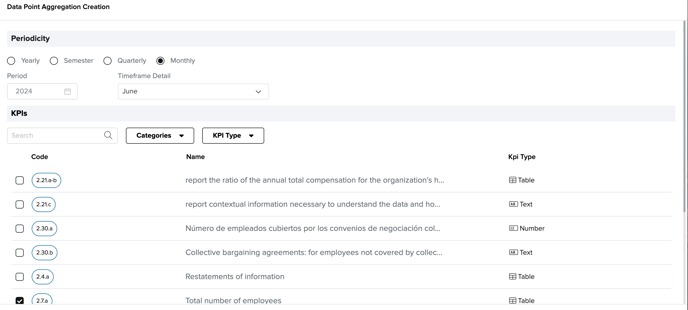
- Assign Attributes: Specify owners, validators, and relevant dimensions.
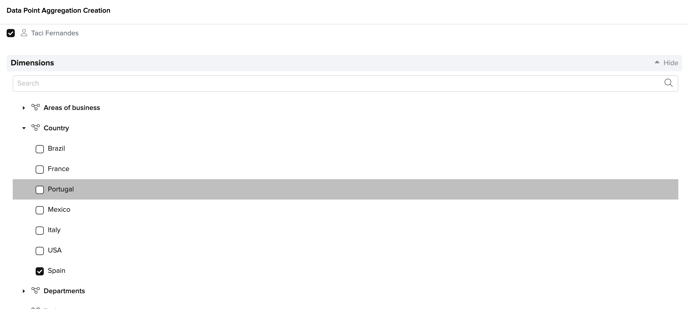
- Choose Aggregation Type:
- Temporal Aggregation: Combines data over a specified time range.
- Dimensional Aggregation: Merges data across defined dimensions.
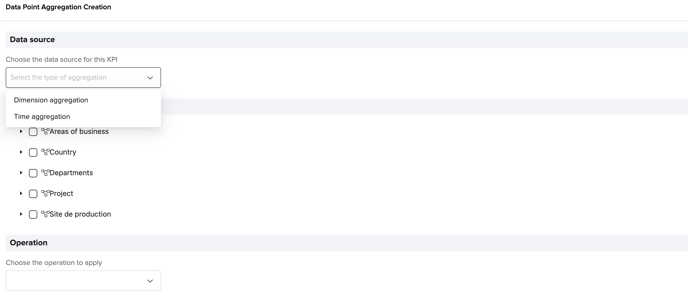
- Select Aggregation Operation: Apply operations such as:
- Sum: Additive total.
- Max/Min: Highest or lowest values.
- Average: Calculated mean.
- AND/OR: Logical operations for qualitative data.
- Concatenation: Merge data entries into one.
- Save: Finalize the aggregation, which will update as contributing datapoints are filled.
Aggregated datapoints provide a streamlined way to synthesize complex data into actionable insights.
Benefits of the Datapoints Feature
- Enhanced Organization: Filters and search functionality allow users to locate datapoints quickly.
- Detailed Insights: Attributes like dimensions, status, and values provide a comprehensive view of data.
- Scalable Creation: Supports individual or bulk datapoint creation to adapt to different reporting needs.
- Advanced Aggregation: Combines data in flexible ways to offer deeper analysis and clarity.
By leveraging Datapoints, users can take control of their data management processes, ensuring that every entry contributes meaningfully to decision-making and organizational growth.
If you still have doubts and need to get in touch with our customer success team, please reach out to "support@aplanet.org" and you will be attended as soon as possible.