![APLANET_Isotipo-1.png]](https://help.aplanet.org/hs-fs/hubfs/APLANET_Isotipo-1.png?height=40&name=APLANET_Isotipo-1.png)
The Reporting Teams feature is a powerful tool designed to simplify the assignment of user roles for data points (DPs) based on Key Performance Indicators (KPIs) and dimension combinations. By automating these assignments, organizations can save time, ensure consistency, and maintain a clear structure for managing and consolidating data.
What Are Reporting Teams?
Reporting Teams are configurations within the system that assign users to specific roles—Data Providers, Validators, and Consolidators—based on predefined KPIs and dimensions. This functionality supports:
- Automatic Assignments: Eliminates manual work by linking users to DPs automatically.
- Customizable Roles: Allows organizations to define roles based on their unique reporting needs.
- Scalable Management: Adapts to various levels of complexity, from simple data input to multi-layered consolidations.
Benefits of Reporting Teams
- Time Efficiency: Automatically assigns users to DPs, reducing administrative overhead.
- Clear Role Distribution: Provides an organized view of responsibilities for KPIs and dimensions.
- Flexible Configuration: Enables easy updates to KPIs, dimensions, and user roles as needs evolve.
- Streamlined Consolidation: Ensures smooth data aggregation across multiple dimensions.
1. Creating a Reporting Team
Step 1: Selecting KPIs and Dimensions
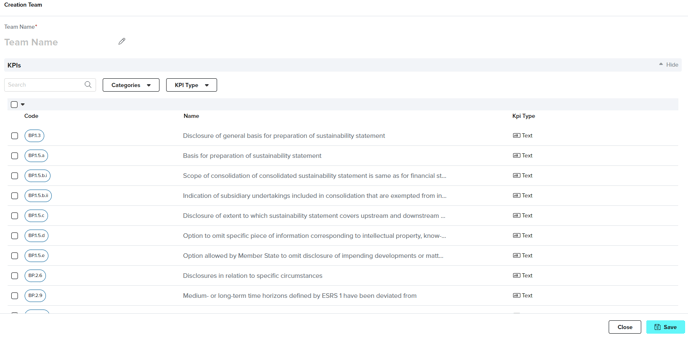
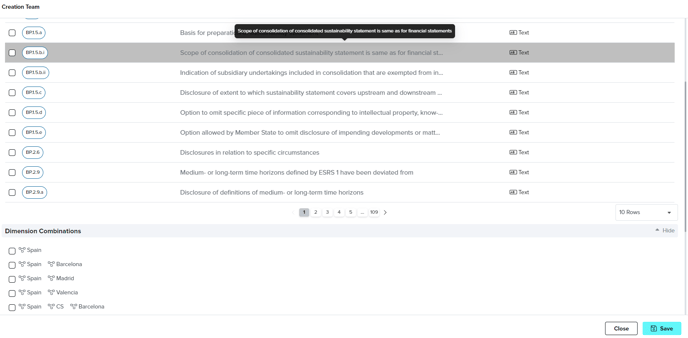
To begin, users define the scope of the Reporting Team:
- Name the Reporting Team: Provide a clear identifier for easy reference.
- Select KPIs: Choose from numeric, table, or other KPIs relevant to the team’s goals.
- Choose Dimensions: Specify combinations of dimensions (e.g., Spain - Madrid, Spain) to apply. Multi-selection allows for efficient setup of multiple dimension combinations.
Step 2: Assigning Consolidation Types
For numeric and table KPIs, users define how data should be aggregated:
- Available Consolidation Types:
- Sum: Combines values across dimensions.
- Average: Calculates the mean.
- Maximum/Minimum: Identifies the highest or lowest values.
- Optional Consolidation: KPIs that don’t require aggregation can remain blank.
This step ensures that aggregated results align with organizational reporting standards.
Step 3: Assigning User Roles
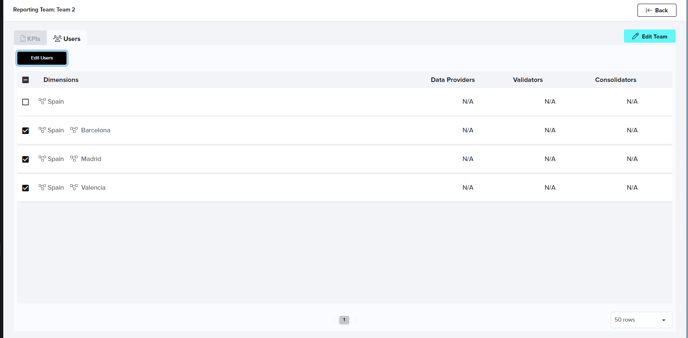
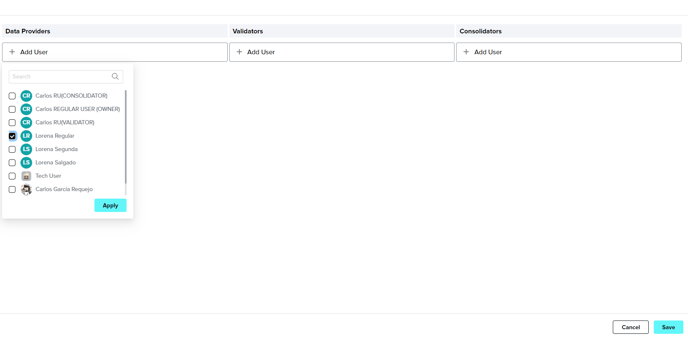
Assign roles to manage data entry, validation, and consolidation:
- Data Providers: Responsible for entering data for each dimension.
- Validators: Confirm the accuracy of data submitted by Data Providers.
- Consolidators: Aggregate data from sub-dimensions into higher-level dimensions.
Users can assign multiple individuals to each role for flexibility. For dimensions requiring only data input, users assign only the Data Provider role.
Example Use Case:
For an organization collecting data for Spain - Madrid and Spain - Barcelona with a consolidated view for Spain:
- Data Providers and Validators are assigned for Madrid and Barcelona.
- A Consolidator aggregates results at the Spain level.
Finalizing the Reporting Team
Once all KPIs, dimensions, and roles are assigned:
- Save the Reporting Team configuration.
- The system automatically assigns the defined users to new DPs under the specified KPIs and dimensions.
This automation minimizes manual errors and ensures consistency in assignments.
2. Editing a Reporting Team
Reporting Teams can be updated to reflect changes in organizational needs.
Steps for Editing
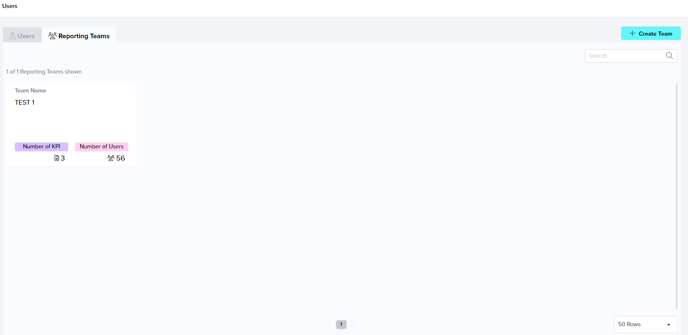
- Access the desired Reporting Team from the list.
- Click the Edit Team button to update KPIs or dimensions.
- Modify user roles or consolidation settings in the relevant tabs:
- Users Tab: Add or remove users and adjust roles for each dimension combination.
- KPIs Tab: Update consolidation types for each KPI.
Practical Example
If a new KPI is introduced or dimension combinations change (e.g., expanding from Spain - Madrid to Spain - Valencia), users can quickly adjust the Reporting Team to accommodate these updates.
Why Use Reporting Teams?
The Reporting Teams functionality is more than just an assignment tool; it’s a comprehensive solution for managing roles, streamlining data entry, and ensuring accurate consolidation across an organization. By automating repetitive tasks and maintaining flexibility, Reporting Teams empower users to focus on strategic decision-making rather than manual processes.
utomatically assigns users (Data Providers, Validators, and Consolidators) to DPs based on team configurations.- Clear Responsibility Assignment: Offers a structured overview of user responsibilities tied to KPIs and dimension combinations.
- Simplified Role Management: Eases the management of user roles and data consolidation processes.
- Flexibility: Provides editing functionalities for KPIs, dimensions, and user roles as needed.
If you still have doubts and need to get in touch with our customer success team, please reach out to "support@aplanet.org" and you will be attended as soon as possible.